Tech Council
Technology Articles
How to Develop Cloud Applications: Complete Planning to Deployment Roadmap 2026
Step-by-step roadmap for cloud app development. Discover planning frameworks, architecture decisions, tech stack selection, and deployment best practices today.

Denis Avramenko
CTO, Co-Founder, Streamlogic
Dec 18, 2025

Reading time: 10 min.
Cloud application development builds software that runs on remote servers managed by providers like AWS, Azure, or Google Cloud. These applications grow automatically when needed and often cost less with proper management and optimization. Development teams focus on building features. McKinsey research shows cloud adoption could generate $3 trillion in EBITDA value by 2030 for global enterprises.
Table of Contents
What is cloud application development
The business case for cloud application development
Cloud service models: choosing your foundation
Security and compliance considerations
Planning your cloud application development project
Architecture patterns for cloud applications
Cloud cost optimization strategies
Technology stack selection for cloud applications
Cloud application development process
Deployment and operations
Common challenges and solutions
Frequently asked questions
What is cloud application development
Cloud application development creates software that runs on remote servers instead of your own hardware, with major cloud providers managing the physical infrastructure through cloud infrastructure services.
The key difference is flexibility - your application runs on virtual resources that can move between servers with minimal disruption, while storage grows independently from computing power. A database expands from 100GB to 10TB without code changes.
Cloud platforms handle routine failures without manual intervention. When one server crashes, the system moves your application to healthy servers within seconds, and development teams also get ready-made cloud infrastructure services for databases, messaging, caching, and user authentication.
The business case for cloud application development
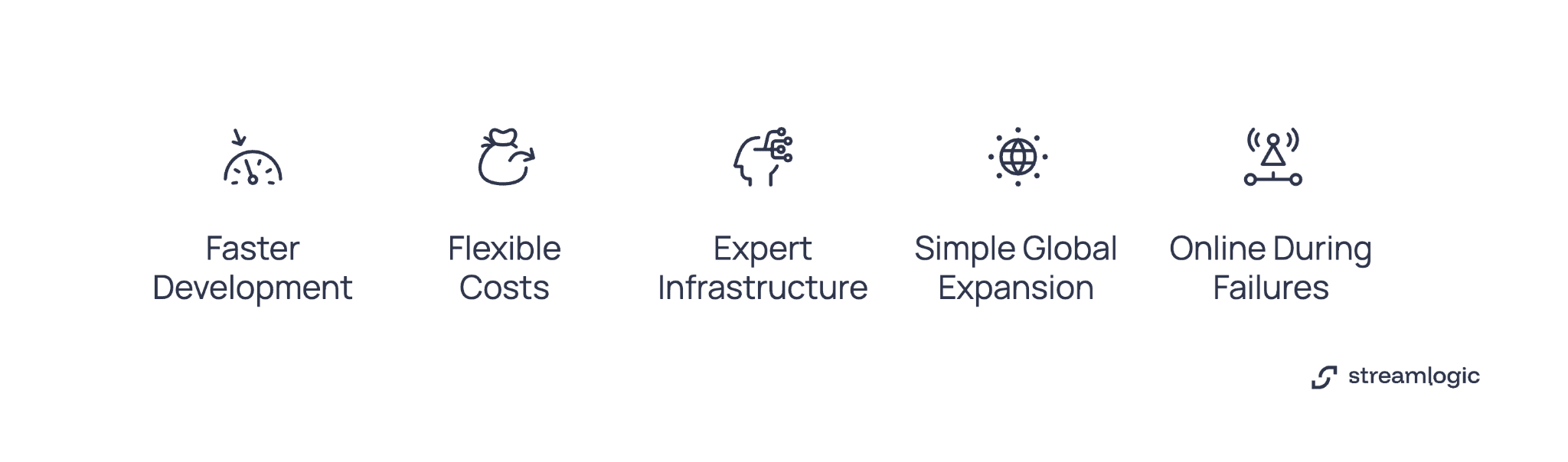
Organizations choose cloud development for practical business advantages.
Development gets faster. Server deployment now completes in minutes. Cloud usage delivers measurable productivity improvements in development. Features that took months now ship in days.
Costs become flexible. Traditional data centers require huge upfront investments, while cloud services charge for what you actually use. During quiet periods, your costs can decrease when architecture and pricing models align with actual demand.
Experts handle infrastructure. Cloud providers employ specialists who manage security and capacity planning for thousands of customers through dedicated cloud infrastructure services. Your development team can concentrate on building features that matter to your business.
Global expansion becomes simple. Cloud platforms offer infrastructure in dozens of locations. You deploy to new geographies through configuration.
Systems stay online during failures. Modern platforms distribute your application across multiple facilities. When hardware breaks, traffic routes to working servers instantly.
Cloud service models: choosing your foundation
Cloud infrastructure services are packaged into distinct models by providers. Each offers different control levels and operational responsibilities.
Infrastructure as a service (IaaS)
IaaS gives you virtual servers, storage, and networks, with services like AWS EC2, Azure Virtual Machines, and Google Compute Engine letting you control operating systems and applications while providers manage physical hardware.
You get maximum control but also maximum responsibility - your team handles operating system updates, security settings, and monitoring.
When to choose IaaS: You're migrating existing applications with minimal changes, need specific configurations, or your team has strong infrastructure expertise.
Platform as a service (PaaS)
PaaS provides ready-made environments where applications run without server management. Heroku, Google App Engine, and AWS Elastic Beanstalk handle infrastructure automatically, letting you push code while the platform sets up servers, manages scaling, and runs maintenance.
Development velocity increases but you have less infrastructure control.
When to choose PaaS: Speed matters more than control, your team concentrates on application logic, and standard platform features meet your requirements.
Software as a service (SaaS)
SaaS delivers complete applications through browsers or APIs, with Salesforce, Google Workspace, and Slack being prime examples. No installation needed - updates deploy in the background without disrupting users.
When to choose SaaS: Existing applications meet your needs and building custom software provides no competitive edge.
Security and compliance considerations
Security must be built in from the start.
Security Practice | Implementation |
Use multiple security layers | Network segmentation isolates components. Web application firewalls filter malicious requests. Intrusion detection systems monitor suspicious activity. |
Encrypt everything | Encrypt stored data and data in transit with TLS 1.2 or higher (TLS 1.3 preferred). Rotate encryption keys regularly. |
Control access strictly | Give users minimum permissions for their roles. Multi-factor authentication protects sensitive operations. |
Maintain compliance continuously | HIPAA, GDPR, SOC 2, and industry regulations require specific controls. Regular audits verify controls still work. |
Log everything | Comprehensive logging helps investigate security incidents and verify compliance. |
Organizations building compliance-ready cloud infrastructure should implement security controls during initial design.
Planning your cloud application development project
Good cloud application development starts with clear planning.
Define what success looks like. Write specific, measurable goals. Examples: reduce infrastructure costs by 40% within six months. Support 10,000 users at once during peak traffic.
List technical requirements early. Know your compliance needs from day one. HIPAA, GDPR, or SOC 2 requirements affect architecture choices. Figure out data location rules. Identify which existing systems you'll integrate with.
Pick your deployment model. Public cloud offers maximum growth potential with shared infrastructure. Private cloud provides dedicated resources for strict isolation. Hybrid cloud combines both. Multi-cloud spreads applications across providers but adds complexity.
Assemble the right team: architects, developers, DevOps engineers, and security specialists.
Architecture patterns for cloud applications
Three main patterns dominate cloud application design.
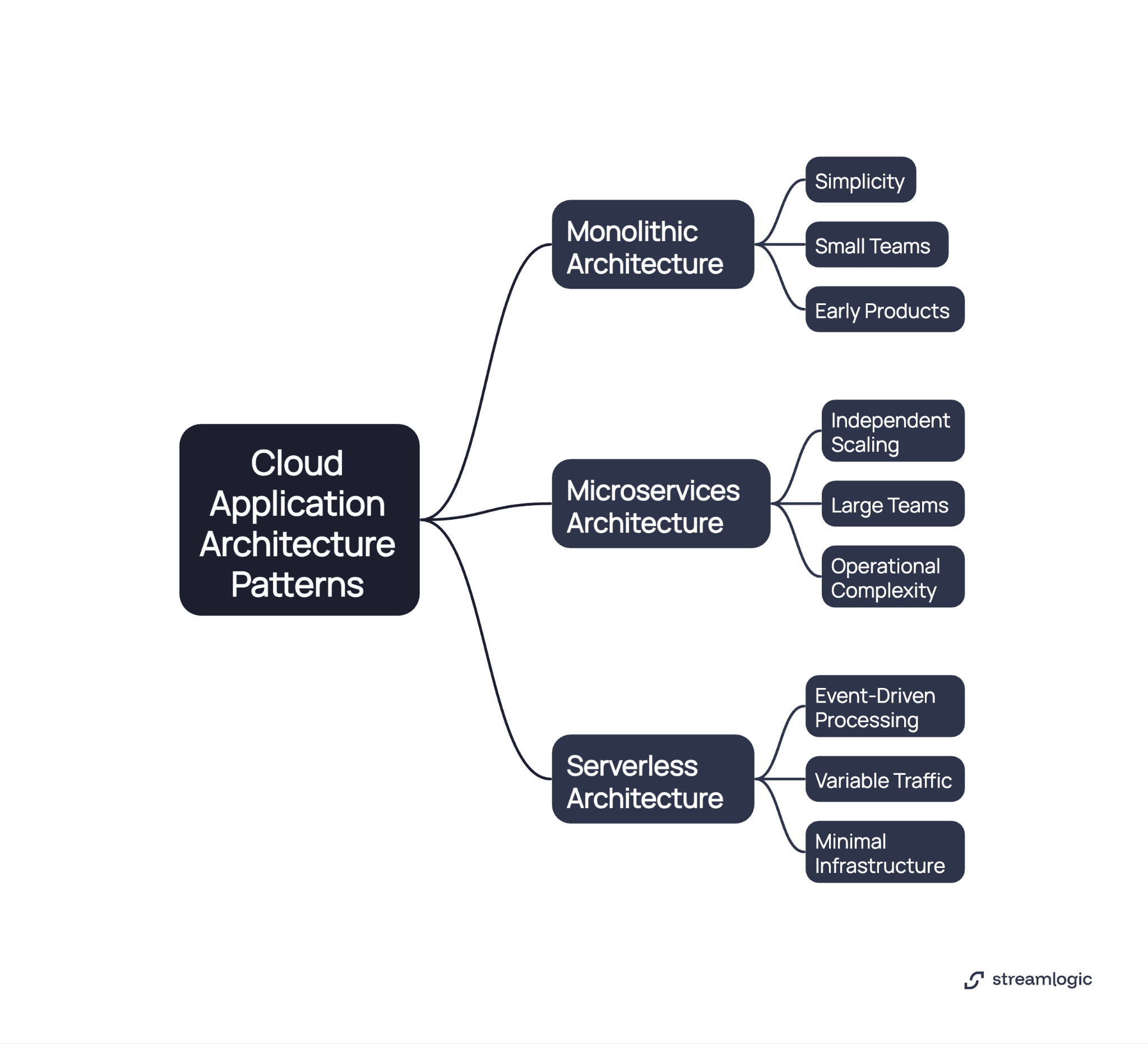
Monolithic architecture
All functionality lives in a single deployable unit with one codebase, one database, and one deployment process.
Monolithic applications are simple to start, allowing small teams to move faster without coordinating between services. Building a MVP typically starts monolithic.
Problems appear at scale - every feature change requires deploying the entire application, different components can't scale separately, and large codebases become hard to understand.
Good for: Early products testing market fit, small teams under 10 engineers, and projects where deployment frequency matters less than simplicity.
Microservices architecture
Applications split into small, independent services, with each microservice handling specific business functions and maintaining its own data storage.
Microservices architecture lets you scale parts independently - run 10 copies of your authentication service but only 2 copies of reporting, while each service deploys on its own schedule.
But operational complexity increases dramatically as network failures happen routinely and debugging requires tracing requests across multiple services.
You need investment in: Service discovery systems, request tracing tools, API management, and container platforms.
Good for: Large teams with multiple squads, applications where components need independent scaling, and products serving millions of users.
Serverless architecture
Serverless platforms run code in response to events without managing servers, with AWS Lambda, Azure Functions, and Google Cloud Functions executing on-demand and scaling automatically.
Serverless works great for event-driven workloads like processing images when users upload them, running scheduled batch jobs, and handling API requests with unpredictable traffic. However, limitations include execution time limits and startup delays.
Good for: Event-driven processing, variable traffic patterns, teams wanting minimal infrastructure work, and applications with distinct, isolated functions.
Cloud cost optimization strategies
Cloud services charge for actual resource use. Managing costs effectively prevents budget problems.
The cost of developing of a cloud application depends on multiple factors including architecture choices, team size, and development timeline. Implementing these strategies helps control expenses:
Strategy | Implementation |
Right-size resources regularly | Monitor utilization, then adjust sizes. Oversized resources waste money. Undersized resources hurt performance. |
Use committed discounts | Reserved instances save 30-60% for predictable workloads. |
Set up autoscaling | Add capacity during high traffic. Remove capacity during quiet periods. |
Optimize storage costs | Move infrequently accessed data to cheaper storage automatically. Archived data costs 90% less than primary storage. |
Monitor spending actively | Cost tags show which teams generate expenses. Budget alerts notify you when spending exceeds limits. |
Remove waste systematically | Unused resources accumulate over time. Development environments running 24/7 waste money. |
Technology stack selection for cloud applications
Frontend technologies
React leads web app development with component-based structure. Good performance and easy to hire developers.
Vue.js has a gentler learning curve while handling production needs.
Angular provides structure for large enterprise applications.
For mobile app development, React Native lets you share code between iOS and Android. Flutter offers an alternative with strong performance.
Backend technologies
Node.js uses JavaScript for both frontend and backend. Works well for applications handling many connections.
Python excels for data-heavy applications and machine learning integration. Django and Flask frameworks speed up development.
Java remains dominant for enterprise applications. Spring Boot simplifies cloud application development.
Go delivers high performance with built-in concurrency support.
Database selection
Relational databases (PostgreSQL, MySQL) provide strong guarantees and complex query abilities. Good for structured data with clear relationships.
NoSQL databases offer flexible schemas and horizontal scaling. MongoDB works well for document storage. DynamoDB provides serverless storage with predictable performance.
Caching layers (Redis, Memcached) reduce database load and improve response times. Essential for high-traffic applications.
Many cloud applications use multiple databases. Choose the best storage type for each use case.
Cloud application development process
Requirements and design phase
Write down what your application must do. User login methods. Data processing workflows. Performance targets.
Define requirements for security, compliance, and reliability. Create diagrams showing system components and data flows. Validate designs with stakeholders before coding starts.
Development and testing
Build your application following architecture specifications by writing modular, testable code and establishing coding standards across your team.
Automated testing catches problems early through unit tests that check individual components, integration tests that verify components work together, and load tests that validate performance.
Continuous integration pipelines run tests when code changes, while Docker containers ensure consistency across development, testing, and production environments.
Code reviews improve quality and share knowledge, with version control systems tracking all changes.
Deployment and operations
Automated pipelines move code from development through staging to production. Infrastructure as code tools like Terraform define environments programmatically.
Blue-green deployments minimize downtime by running two identical production environments. You deploy the new version alongside the current one, then switch traffic over after validation confirms everything works. If problems emerge, switching back takes seconds.
Canary deployments take a more gradual approach, shifting small percentages of traffic to new versions while monitoring error rates and performance metrics. Start with 5% of users, then expand to 25%, 50%, and finally 100% as confidence grows. When problems surface, automatic rollback protects the majority of your users from experiencing issues.
Organizations requiring secure cloud migration should build strong deployment automation before production launches, ensuring every release follows the same tested process.
Deployment and operations: best practices
Production deployment requires careful planning and automation.
Best Practice | Details |
Choose deployment regions strategically | Deploy close to users to reduce delays. Regulations might require specific geographic locations. |
Set up thorough health checks | Load balancers remove unhealthy instances from rotation. Automated recovery restarts failed processes. |
Plan capacity carefully | Baseline capacity handles normal traffic. Autoscaling manages traffic spikes. |
Start monitoring from day one | Track error rates, response times, and resource use. Alert on problems before users notice. |
Document operational procedures | Runbooks guide teams through common scenarios. Incident response plans minimize recovery time. |
Common challenges and solutions
Challenge | Solution |
Managing distributed complexity | Service meshes simplify communication between services. Tracing tools visualize requests across services. |
Controlling cloud spending | Implement cost tracking from project start. Regular reviews prevent surprise bills. |
Ensuring data consistency | Choose appropriate consistency models for each use case. Eventual consistency works for many scenarios. Strong consistency remains necessary for financial transactions. |
Debugging production issues | Correlation IDs track requests across services. Centralized logging combines events from all components. |
Maintaining security | Automated security scanning detects vulnerabilities continuously. Regular penetration testing validates defenses. |
Managing technical debt | Regular refactoring prevents debt accumulation. Automated testing provides safety for improvements. |
FAQ
How long does cloud application development typically take?
Timeline depends on complexity, team size, and architecture. Simple MVPs deploy in 2-3 months with small teams. Medium complexity applications need 4-8 months. Enterprise systems require 8-18+ months. Microservices architecture takes longer than monolithic due to extra infrastructure needs.
What's the difference between cloud-native and cloud-based applications?
Cloud-native applications are designed specifically for cloud from the start, using microservices, containers, and cloud services. Cloud-based applications run on cloud infrastructure but may have started as traditional applications migrated to the cloud. Cloud-native applications use platform capabilities more extensively.
How do I choose between monolithic and microservices architecture?
Start monolithic for most projects. Microservices add complexity that small teams struggle to manage. Move to microservices when your team exceeds 10-15 engineers, when you need independent scaling, or when deployment coordination slows development.
What security certifications should cloud applications target?
Target certifications based on your industry and customers. SOC 2 proves security controls to enterprise customers. HIPAA compliance is mandatory for healthcare. PCI DSS is required for payment processing. GDPR compliance applies when handling European user data.
How can I reduce cloud application development costs?
Choose PaaS over IaaS when possible to reduce infrastructure work. Start with managed services. Set up autoscaling to avoid over-provisioning. Use reserved instances for stable workloads. Monitor spending actively with proper attribution.
Conclusion
Cloud application development changes how organizations build and deploy software. This approach has become standard practice across the industry.
Success requires careful planning, appropriate architecture choices, and disciplined execution. Proper foundations deliver significant productivity improvements. These foundations include secure infrastructure, automated deployment pipelines, and thorough monitoring.
The path from planning to deployment involves many decisions. Prioritizing security, maintainability, and operational excellence from the start avoids costly rework later.
Production-grade cloud applications need compliance-ready cloud infrastructure designed for scale, security, and reliability from day one. Talk to our cloud experts to discuss your project requirements.
Denis Avramenko
CTO, Co-Founder, Streamlogic

Technology Articles
Cloud Modernization Strategy Guide for Enterprises 2026
Dec 18, 2025
Technology Articles
How to Develop Cloud Applications: Complete Planning to Deployment Roadmap 2026
Dec 18, 2025

Technology Articles
Cloud Compliance in 2026: Navigating Standards, Strategies, and Best Practices
Dec 12, 2025
Technology Articles
Cloud Modernization Strategy Guide for Enterprises 2026
Dec 18, 2025
Technology Articles
How to Develop Cloud Applications: Complete Planning to Deployment Roadmap 2026
Dec 18, 2025
Technology Articles
Cloud Compliance in 2026: Navigating Standards, Strategies, and Best Practices
Dec 12, 2025
Reading time: 10 min.
Cloud application development builds software that runs on remote servers managed by providers like AWS, Azure, or Google Cloud. These applications grow automatically when needed and often cost less with proper management and optimization. Development teams focus on building features. McKinsey research shows cloud adoption could generate $3 trillion in EBITDA value by 2030 for global enterprises.
Table of Contents
What is cloud application development
The business case for cloud application development
Cloud service models: choosing your foundation
Security and compliance considerations
Planning your cloud application development project
Architecture patterns for cloud applications
Cloud cost optimization strategies
Technology stack selection for cloud applications
Cloud application development process
Deployment and operations
Common challenges and solutions
Frequently asked questions
What is cloud application development
Cloud application development creates software that runs on remote servers instead of your own hardware, with major cloud providers managing the physical infrastructure through cloud infrastructure services.
The key difference is flexibility - your application runs on virtual resources that can move between servers with minimal disruption, while storage grows independently from computing power. A database expands from 100GB to 10TB without code changes.
Cloud platforms handle routine failures without manual intervention. When one server crashes, the system moves your application to healthy servers within seconds, and development teams also get ready-made cloud infrastructure services for databases, messaging, caching, and user authentication.
The business case for cloud application development
Organizations choose cloud development for practical business advantages.
Development gets faster. Server deployment now completes in minutes. Cloud usage delivers measurable productivity improvements in development. Features that took months now ship in days.
Costs become flexible. Traditional data centers require huge upfront investments, while cloud services charge for what you actually use. During quiet periods, your costs can decrease when architecture and pricing models align with actual demand.
Experts handle infrastructure. Cloud providers employ specialists who manage security and capacity planning for thousands of customers through dedicated cloud infrastructure services. Your development team can concentrate on building features that matter to your business.
Global expansion becomes simple. Cloud platforms offer infrastructure in dozens of locations. You deploy to new geographies through configuration.
Systems stay online during failures. Modern platforms distribute your application across multiple facilities. When hardware breaks, traffic routes to working servers instantly.
Cloud service models: choosing your foundation
Cloud infrastructure services are packaged into distinct models by providers. Each offers different control levels and operational responsibilities.
Infrastructure as a service (IaaS)
IaaS gives you virtual servers, storage, and networks, with services like AWS EC2, Azure Virtual Machines, and Google Compute Engine letting you control operating systems and applications while providers manage physical hardware.
You get maximum control but also maximum responsibility - your team handles operating system updates, security settings, and monitoring.
When to choose IaaS: You're migrating existing applications with minimal changes, need specific configurations, or your team has strong infrastructure expertise.
Platform as a service (PaaS)
PaaS provides ready-made environments where applications run without server management. Heroku, Google App Engine, and AWS Elastic Beanstalk handle infrastructure automatically, letting you push code while the platform sets up servers, manages scaling, and runs maintenance.
Development velocity increases but you have less infrastructure control.
When to choose PaaS: Speed matters more than control, your team concentrates on application logic, and standard platform features meet your requirements.
Software as a service (SaaS)
SaaS delivers complete applications through browsers or APIs, with Salesforce, Google Workspace, and Slack being prime examples. No installation needed - updates deploy in the background without disrupting users.
When to choose SaaS: Existing applications meet your needs and building custom software provides no competitive edge.
Security and compliance considerations
Security must be built in from the start.
Security Practice | Implementation |
Use multiple security layers | Network segmentation isolates components. Web application firewalls filter malicious requests. Intrusion detection systems monitor suspicious activity. |
Encrypt everything | Encrypt stored data and data in transit with TLS 1.2 or higher (TLS 1.3 preferred). Rotate encryption keys regularly. |
Control access strictly | Give users minimum permissions for their roles. Multi-factor authentication protects sensitive operations. |
Maintain compliance continuously | HIPAA, GDPR, SOC 2, and industry regulations require specific controls. Regular audits verify controls still work. |
Log everything | Comprehensive logging helps investigate security incidents and verify compliance. |
Organizations building compliance-ready cloud infrastructure should implement security controls during initial design.
Planning your cloud application development project
Good cloud application development starts with clear planning.
Define what success looks like. Write specific, measurable goals. Examples: reduce infrastructure costs by 40% within six months. Support 10,000 users at once during peak traffic.
List technical requirements early. Know your compliance needs from day one. HIPAA, GDPR, or SOC 2 requirements affect architecture choices. Figure out data location rules. Identify which existing systems you'll integrate with.
Pick your deployment model. Public cloud offers maximum growth potential with shared infrastructure. Private cloud provides dedicated resources for strict isolation. Hybrid cloud combines both. Multi-cloud spreads applications across providers but adds complexity.
Assemble the right team: architects, developers, DevOps engineers, and security specialists.
Architecture patterns for cloud applications
Three main patterns dominate cloud application design.
Monolithic architecture
All functionality lives in a single deployable unit with one codebase, one database, and one deployment process.
Monolithic applications are simple to start, allowing small teams to move faster without coordinating between services. Building a MVP typically starts monolithic.
Problems appear at scale - every feature change requires deploying the entire application, different components can't scale separately, and large codebases become hard to understand.
Good for: Early products testing market fit, small teams under 10 engineers, and projects where deployment frequency matters less than simplicity.
Microservices architecture
Applications split into small, independent services, with each microservice handling specific business functions and maintaining its own data storage.
Microservices architecture lets you scale parts independently - run 10 copies of your authentication service but only 2 copies of reporting, while each service deploys on its own schedule.
But operational complexity increases dramatically as network failures happen routinely and debugging requires tracing requests across multiple services.
You need investment in: Service discovery systems, request tracing tools, API management, and container platforms.
Good for: Large teams with multiple squads, applications where components need independent scaling, and products serving millions of users.
Serverless architecture
Serverless platforms run code in response to events without managing servers, with AWS Lambda, Azure Functions, and Google Cloud Functions executing on-demand and scaling automatically.
Serverless works great for event-driven workloads like processing images when users upload them, running scheduled batch jobs, and handling API requests with unpredictable traffic. However, limitations include execution time limits and startup delays.
Good for: Event-driven processing, variable traffic patterns, teams wanting minimal infrastructure work, and applications with distinct, isolated functions.
Cloud cost optimization strategies
Cloud services charge for actual resource use. Managing costs effectively prevents budget problems.
The cost of developing of a cloud application depends on multiple factors including architecture choices, team size, and development timeline. Implementing these strategies helps control expenses:
Strategy | Implementation |
Right-size resources regularly | Monitor utilization, then adjust sizes. Oversized resources waste money. Undersized resources hurt performance. |
Use committed discounts | Reserved instances save 30-60% for predictable workloads. |
Set up autoscaling | Add capacity during high traffic. Remove capacity during quiet periods. |
Optimize storage costs | Move infrequently accessed data to cheaper storage automatically. Archived data costs 90% less than primary storage. |
Monitor spending actively | Cost tags show which teams generate expenses. Budget alerts notify you when spending exceeds limits. |
Remove waste systematically | Unused resources accumulate over time. Development environments running 24/7 waste money. |
Technology stack selection for cloud applications
Frontend technologies
React leads web app development with component-based structure. Good performance and easy to hire developers.
Vue.js has a gentler learning curve while handling production needs.
Angular provides structure for large enterprise applications.
For mobile app development, React Native lets you share code between iOS and Android. Flutter offers an alternative with strong performance.
Backend technologies
Node.js uses JavaScript for both frontend and backend. Works well for applications handling many connections.
Python excels for data-heavy applications and machine learning integration. Django and Flask frameworks speed up development.
Java remains dominant for enterprise applications. Spring Boot simplifies cloud application development.
Go delivers high performance with built-in concurrency support.
Database selection
Relational databases (PostgreSQL, MySQL) provide strong guarantees and complex query abilities. Good for structured data with clear relationships.
NoSQL databases offer flexible schemas and horizontal scaling. MongoDB works well for document storage. DynamoDB provides serverless storage with predictable performance.
Caching layers (Redis, Memcached) reduce database load and improve response times. Essential for high-traffic applications.
Many cloud applications use multiple databases. Choose the best storage type for each use case.
Cloud application development process
Requirements and design phase
Write down what your application must do. User login methods. Data processing workflows. Performance targets.
Define requirements for security, compliance, and reliability. Create diagrams showing system components and data flows. Validate designs with stakeholders before coding starts.
Development and testing
Build your application following architecture specifications by writing modular, testable code and establishing coding standards across your team.
Automated testing catches problems early through unit tests that check individual components, integration tests that verify components work together, and load tests that validate performance.
Continuous integration pipelines run tests when code changes, while Docker containers ensure consistency across development, testing, and production environments.
Code reviews improve quality and share knowledge, with version control systems tracking all changes.
Deployment and operations
Automated pipelines move code from development through staging to production. Infrastructure as code tools like Terraform define environments programmatically.
Blue-green deployments minimize downtime by running two identical production environments. You deploy the new version alongside the current one, then switch traffic over after validation confirms everything works. If problems emerge, switching back takes seconds.
Canary deployments take a more gradual approach, shifting small percentages of traffic to new versions while monitoring error rates and performance metrics. Start with 5% of users, then expand to 25%, 50%, and finally 100% as confidence grows. When problems surface, automatic rollback protects the majority of your users from experiencing issues.
Organizations requiring secure cloud migration should build strong deployment automation before production launches, ensuring every release follows the same tested process.
Deployment and operations: best practices
Production deployment requires careful planning and automation.
Best Practice | Details |
Choose deployment regions strategically | Deploy close to users to reduce delays. Regulations might require specific geographic locations. |
Set up thorough health checks | Load balancers remove unhealthy instances from rotation. Automated recovery restarts failed processes. |
Plan capacity carefully | Baseline capacity handles normal traffic. Autoscaling manages traffic spikes. |
Start monitoring from day one | Track error rates, response times, and resource use. Alert on problems before users notice. |
Document operational procedures | Runbooks guide teams through common scenarios. Incident response plans minimize recovery time. |
Common challenges and solutions
Challenge | Solution |
Managing distributed complexity | Service meshes simplify communication between services. Tracing tools visualize requests across services. |
Controlling cloud spending | Implement cost tracking from project start. Regular reviews prevent surprise bills. |
Ensuring data consistency | Choose appropriate consistency models for each use case. Eventual consistency works for many scenarios. Strong consistency remains necessary for financial transactions. |
Debugging production issues | Correlation IDs track requests across services. Centralized logging combines events from all components. |
Maintaining security | Automated security scanning detects vulnerabilities continuously. Regular penetration testing validates defenses. |
Managing technical debt | Regular refactoring prevents debt accumulation. Automated testing provides safety for improvements. |
FAQ
How long does cloud application development typically take?
Timeline depends on complexity, team size, and architecture. Simple MVPs deploy in 2-3 months with small teams. Medium complexity applications need 4-8 months. Enterprise systems require 8-18+ months. Microservices architecture takes longer than monolithic due to extra infrastructure needs.
What's the difference between cloud-native and cloud-based applications?
Cloud-native applications are designed specifically for cloud from the start, using microservices, containers, and cloud services. Cloud-based applications run on cloud infrastructure but may have started as traditional applications migrated to the cloud. Cloud-native applications use platform capabilities more extensively.
How do I choose between monolithic and microservices architecture?
Start monolithic for most projects. Microservices add complexity that small teams struggle to manage. Move to microservices when your team exceeds 10-15 engineers, when you need independent scaling, or when deployment coordination slows development.
What security certifications should cloud applications target?
Target certifications based on your industry and customers. SOC 2 proves security controls to enterprise customers. HIPAA compliance is mandatory for healthcare. PCI DSS is required for payment processing. GDPR compliance applies when handling European user data.
How can I reduce cloud application development costs?
Choose PaaS over IaaS when possible to reduce infrastructure work. Start with managed services. Set up autoscaling to avoid over-provisioning. Use reserved instances for stable workloads. Monitor spending actively with proper attribution.
Conclusion
Cloud application development changes how organizations build and deploy software. This approach has become standard practice across the industry.
Success requires careful planning, appropriate architecture choices, and disciplined execution. Proper foundations deliver significant productivity improvements. These foundations include secure infrastructure, automated deployment pipelines, and thorough monitoring.
The path from planning to deployment involves many decisions. Prioritizing security, maintainability, and operational excellence from the start avoids costly rework later.
Production-grade cloud applications need compliance-ready cloud infrastructure designed for scale, security, and reliability from day one. Talk to our cloud experts to discuss your project requirements.
Denis Avramenko
CTO, Co-Founder, Streamlogic
Reading time: 10 min.
Cloud application development builds software that runs on remote servers managed by providers like AWS, Azure, or Google Cloud. These applications grow automatically when needed and often cost less with proper management and optimization. Development teams focus on building features. McKinsey research shows cloud adoption could generate $3 trillion in EBITDA value by 2030 for global enterprises.
Table of Contents
What is cloud application development
The business case for cloud application development
Cloud service models: choosing your foundation
Security and compliance considerations
Planning your cloud application development project
Architecture patterns for cloud applications
Cloud cost optimization strategies
Technology stack selection for cloud applications
Cloud application development process
Deployment and operations
Common challenges and solutions
Frequently asked questions
What is cloud application development
Cloud application development creates software that runs on remote servers instead of your own hardware, with major cloud providers managing the physical infrastructure through cloud infrastructure services.
The key difference is flexibility - your application runs on virtual resources that can move between servers with minimal disruption, while storage grows independently from computing power. A database expands from 100GB to 10TB without code changes.
Cloud platforms handle routine failures without manual intervention. When one server crashes, the system moves your application to healthy servers within seconds, and development teams also get ready-made cloud infrastructure services for databases, messaging, caching, and user authentication.
The business case for cloud application development
Organizations choose cloud development for practical business advantages.
Development gets faster. Server deployment now completes in minutes. Cloud usage delivers measurable productivity improvements in development. Features that took months now ship in days.
Costs become flexible. Traditional data centers require huge upfront investments, while cloud services charge for what you actually use. During quiet periods, your costs can decrease when architecture and pricing models align with actual demand.
Experts handle infrastructure. Cloud providers employ specialists who manage security and capacity planning for thousands of customers through dedicated cloud infrastructure services. Your development team can concentrate on building features that matter to your business.
Global expansion becomes simple. Cloud platforms offer infrastructure in dozens of locations. You deploy to new geographies through configuration.
Systems stay online during failures. Modern platforms distribute your application across multiple facilities. When hardware breaks, traffic routes to working servers instantly.
Cloud service models: choosing your foundation
Cloud infrastructure services are packaged into distinct models by providers. Each offers different control levels and operational responsibilities.
Infrastructure as a service (IaaS)
IaaS gives you virtual servers, storage, and networks, with services like AWS EC2, Azure Virtual Machines, and Google Compute Engine letting you control operating systems and applications while providers manage physical hardware.
You get maximum control but also maximum responsibility - your team handles operating system updates, security settings, and monitoring.
When to choose IaaS: You're migrating existing applications with minimal changes, need specific configurations, or your team has strong infrastructure expertise.
Platform as a service (PaaS)
PaaS provides ready-made environments where applications run without server management. Heroku, Google App Engine, and AWS Elastic Beanstalk handle infrastructure automatically, letting you push code while the platform sets up servers, manages scaling, and runs maintenance.
Development velocity increases but you have less infrastructure control.
When to choose PaaS: Speed matters more than control, your team concentrates on application logic, and standard platform features meet your requirements.
Software as a service (SaaS)
SaaS delivers complete applications through browsers or APIs, with Salesforce, Google Workspace, and Slack being prime examples. No installation needed - updates deploy in the background without disrupting users.
When to choose SaaS: Existing applications meet your needs and building custom software provides no competitive edge.
Security and compliance considerations
Security must be built in from the start.
Security Practice | Implementation |
Use multiple security layers | Network segmentation isolates components. Web application firewalls filter malicious requests. Intrusion detection systems monitor suspicious activity. |
Encrypt everything | Encrypt stored data and data in transit with TLS 1.2 or higher (TLS 1.3 preferred). Rotate encryption keys regularly. |
Control access strictly | Give users minimum permissions for their roles. Multi-factor authentication protects sensitive operations. |
Maintain compliance continuously | HIPAA, GDPR, SOC 2, and industry regulations require specific controls. Regular audits verify controls still work. |
Log everything | Comprehensive logging helps investigate security incidents and verify compliance. |
Organizations building compliance-ready cloud infrastructure should implement security controls during initial design.
Planning your cloud application development project
Good cloud application development starts with clear planning.
Define what success looks like. Write specific, measurable goals. Examples: reduce infrastructure costs by 40% within six months. Support 10,000 users at once during peak traffic.
List technical requirements early. Know your compliance needs from day one. HIPAA, GDPR, or SOC 2 requirements affect architecture choices. Figure out data location rules. Identify which existing systems you'll integrate with.
Pick your deployment model. Public cloud offers maximum growth potential with shared infrastructure. Private cloud provides dedicated resources for strict isolation. Hybrid cloud combines both. Multi-cloud spreads applications across providers but adds complexity.
Assemble the right team: architects, developers, DevOps engineers, and security specialists.
Architecture patterns for cloud applications
Three main patterns dominate cloud application design.
Monolithic architecture
All functionality lives in a single deployable unit with one codebase, one database, and one deployment process.
Monolithic applications are simple to start, allowing small teams to move faster without coordinating between services. Building a MVP typically starts monolithic.
Problems appear at scale - every feature change requires deploying the entire application, different components can't scale separately, and large codebases become hard to understand.
Good for: Early products testing market fit, small teams under 10 engineers, and projects where deployment frequency matters less than simplicity.
Microservices architecture
Applications split into small, independent services, with each microservice handling specific business functions and maintaining its own data storage.
Microservices architecture lets you scale parts independently - run 10 copies of your authentication service but only 2 copies of reporting, while each service deploys on its own schedule.
But operational complexity increases dramatically as network failures happen routinely and debugging requires tracing requests across multiple services.
You need investment in: Service discovery systems, request tracing tools, API management, and container platforms.
Good for: Large teams with multiple squads, applications where components need independent scaling, and products serving millions of users.
Serverless architecture
Serverless platforms run code in response to events without managing servers, with AWS Lambda, Azure Functions, and Google Cloud Functions executing on-demand and scaling automatically.
Serverless works great for event-driven workloads like processing images when users upload them, running scheduled batch jobs, and handling API requests with unpredictable traffic. However, limitations include execution time limits and startup delays.
Good for: Event-driven processing, variable traffic patterns, teams wanting minimal infrastructure work, and applications with distinct, isolated functions.
Cloud cost optimization strategies
Cloud services charge for actual resource use. Managing costs effectively prevents budget problems.
The cost of developing of a cloud application depends on multiple factors including architecture choices, team size, and development timeline. Implementing these strategies helps control expenses:
Strategy | Implementation |
Right-size resources regularly | Monitor utilization, then adjust sizes. Oversized resources waste money. Undersized resources hurt performance. |
Use committed discounts | Reserved instances save 30-60% for predictable workloads. |
Set up autoscaling | Add capacity during high traffic. Remove capacity during quiet periods. |
Optimize storage costs | Move infrequently accessed data to cheaper storage automatically. Archived data costs 90% less than primary storage. |
Monitor spending actively | Cost tags show which teams generate expenses. Budget alerts notify you when spending exceeds limits. |
Remove waste systematically | Unused resources accumulate over time. Development environments running 24/7 waste money. |
Technology stack selection for cloud applications
Frontend technologies
React leads web app development with component-based structure. Good performance and easy to hire developers.
Vue.js has a gentler learning curve while handling production needs.
Angular provides structure for large enterprise applications.
For mobile app development, React Native lets you share code between iOS and Android. Flutter offers an alternative with strong performance.
Backend technologies
Node.js uses JavaScript for both frontend and backend. Works well for applications handling many connections.
Python excels for data-heavy applications and machine learning integration. Django and Flask frameworks speed up development.
Java remains dominant for enterprise applications. Spring Boot simplifies cloud application development.
Go delivers high performance with built-in concurrency support.
Database selection
Relational databases (PostgreSQL, MySQL) provide strong guarantees and complex query abilities. Good for structured data with clear relationships.
NoSQL databases offer flexible schemas and horizontal scaling. MongoDB works well for document storage. DynamoDB provides serverless storage with predictable performance.
Caching layers (Redis, Memcached) reduce database load and improve response times. Essential for high-traffic applications.
Many cloud applications use multiple databases. Choose the best storage type for each use case.
Cloud application development process
Requirements and design phase
Write down what your application must do. User login methods. Data processing workflows. Performance targets.
Define requirements for security, compliance, and reliability. Create diagrams showing system components and data flows. Validate designs with stakeholders before coding starts.
Development and testing
Build your application following architecture specifications by writing modular, testable code and establishing coding standards across your team.
Automated testing catches problems early through unit tests that check individual components, integration tests that verify components work together, and load tests that validate performance.
Continuous integration pipelines run tests when code changes, while Docker containers ensure consistency across development, testing, and production environments.
Code reviews improve quality and share knowledge, with version control systems tracking all changes.
Deployment and operations
Automated pipelines move code from development through staging to production. Infrastructure as code tools like Terraform define environments programmatically.
Blue-green deployments minimize downtime by running two identical production environments. You deploy the new version alongside the current one, then switch traffic over after validation confirms everything works. If problems emerge, switching back takes seconds.
Canary deployments take a more gradual approach, shifting small percentages of traffic to new versions while monitoring error rates and performance metrics. Start with 5% of users, then expand to 25%, 50%, and finally 100% as confidence grows. When problems surface, automatic rollback protects the majority of your users from experiencing issues.
Organizations requiring secure cloud migration should build strong deployment automation before production launches, ensuring every release follows the same tested process.
Deployment and operations: best practices
Production deployment requires careful planning and automation.
Best Practice | Details |
Choose deployment regions strategically | Deploy close to users to reduce delays. Regulations might require specific geographic locations. |
Set up thorough health checks | Load balancers remove unhealthy instances from rotation. Automated recovery restarts failed processes. |
Plan capacity carefully | Baseline capacity handles normal traffic. Autoscaling manages traffic spikes. |
Start monitoring from day one | Track error rates, response times, and resource use. Alert on problems before users notice. |
Document operational procedures | Runbooks guide teams through common scenarios. Incident response plans minimize recovery time. |
Common challenges and solutions
Challenge | Solution |
Managing distributed complexity | Service meshes simplify communication between services. Tracing tools visualize requests across services. |
Controlling cloud spending | Implement cost tracking from project start. Regular reviews prevent surprise bills. |
Ensuring data consistency | Choose appropriate consistency models for each use case. Eventual consistency works for many scenarios. Strong consistency remains necessary for financial transactions. |
Debugging production issues | Correlation IDs track requests across services. Centralized logging combines events from all components. |
Maintaining security | Automated security scanning detects vulnerabilities continuously. Regular penetration testing validates defenses. |
Managing technical debt | Regular refactoring prevents debt accumulation. Automated testing provides safety for improvements. |
FAQ
How long does cloud application development typically take?
Timeline depends on complexity, team size, and architecture. Simple MVPs deploy in 2-3 months with small teams. Medium complexity applications need 4-8 months. Enterprise systems require 8-18+ months. Microservices architecture takes longer than monolithic due to extra infrastructure needs.
What's the difference between cloud-native and cloud-based applications?
Cloud-native applications are designed specifically for cloud from the start, using microservices, containers, and cloud services. Cloud-based applications run on cloud infrastructure but may have started as traditional applications migrated to the cloud. Cloud-native applications use platform capabilities more extensively.
How do I choose between monolithic and microservices architecture?
Start monolithic for most projects. Microservices add complexity that small teams struggle to manage. Move to microservices when your team exceeds 10-15 engineers, when you need independent scaling, or when deployment coordination slows development.
What security certifications should cloud applications target?
Target certifications based on your industry and customers. SOC 2 proves security controls to enterprise customers. HIPAA compliance is mandatory for healthcare. PCI DSS is required for payment processing. GDPR compliance applies when handling European user data.
How can I reduce cloud application development costs?
Choose PaaS over IaaS when possible to reduce infrastructure work. Start with managed services. Set up autoscaling to avoid over-provisioning. Use reserved instances for stable workloads. Monitor spending actively with proper attribution.
Conclusion
Cloud application development changes how organizations build and deploy software. This approach has become standard practice across the industry.
Success requires careful planning, appropriate architecture choices, and disciplined execution. Proper foundations deliver significant productivity improvements. These foundations include secure infrastructure, automated deployment pipelines, and thorough monitoring.
The path from planning to deployment involves many decisions. Prioritizing security, maintainability, and operational excellence from the start avoids costly rework later.
Production-grade cloud applications need compliance-ready cloud infrastructure designed for scale, security, and reliability from day one. Talk to our cloud experts to discuss your project requirements.
Denis Avramenko
CTO, Co-Founder, Streamlogic
Technology Articles
Cloud Modernization Strategy Guide for Enterprises 2026
Dec 18, 2025
Technology Articles
How to Develop Cloud Applications: Complete Planning to Deployment Roadmap 2026
Dec 18, 2025
Technology Articles
Cloud Compliance in 2026: Navigating Standards, Strategies, and Best Practices
Dec 12, 2025
Tech Council
Technology Articles
How to Develop Cloud Applications: Complete Planning to Deployment Roadmap 2026
Step-by-step roadmap for cloud app development. Discover planning frameworks, architecture decisions, tech stack selection, and deployment best practices today.
Denis Avramenko
CTO, Co-Founder, Streamlogic
Dec 18, 2025