Tech Council
Technology Articles
Cloud migration step by step: 7 stages for success in 2026
Complete cloud migration roadmap. Learn AWS, Azure, GCP migration strategies, security practices, and how to reduce cloud costs while ensuring compliance.

Denis Avramenko
CTO, Co-Founder, Streamlogic
Dec 6, 2025

Reading Time: 10 minutes
Cloud migration moves applications, databases, and workloads from on-premises infrastructure to platforms like AWS, Azure, or GCP. Teams stop managing hardware failures and focus on building features that drive revenue.
According to Gartner's latest forecast, worldwide spending on public cloud services will reach $723.4 billion in 2025, up 21.5% from the previous year. The same research predicts that 90% of organizations will adopt hybrid cloud approaches through 2027. Properly executed migrations deliver substantial infrastructure cost reductions and accelerate deployment cycles from months to days.
Table of contents
What drives companies to migrate
Stage 1: Define business objectives and migration readiness assessment
Stage 2: Select your cloud strategy and provider
Stage 3: Design cloud architecture and migration roadmap
Stage 4: Prepare applications and data for migration
Stage 5: Execute migration using proven strategies
Streamlogic case study: Logistics dashboard MVP in 4 weeks
Stage 6: Validate security, performance, and compliance
Stage 7: Optimize cloud costs and operations
What drives companies to migrate

Three pressures typically force migration decisions. First, infrastructure costs keep rising while budgets stay flat. Second, competitors launch features faster because they're not constrained by procurement cycles. Third, customers expect always-on services that traditional infrastructure struggles to deliver economically.
IDC's 2024 Cloud Pulse Survey found that 60% of cloud buyers believe their IT infrastructure requires major transformation, while 82% reported their existing cloud environments need modernization. These responses reflect concrete problems: applications can't handle seasonal traffic spikes, security vulnerabilities persist in aging systems, and operational complexity consumes engineering time.
Migration addresses these challenges by shifting infrastructure management to specialists. Cloud providers handle most infrastructure‑level security patches, capacity, and disaster recovery, while customers still own application and data security under a shared responsibility model.
Stage 1: Define business objectives and migration readiness assessment
Set clear goals
Document specific, measurable outcomes before technical work begins. Concrete targets with numbers and deadlines work best: reduce monthly infrastructure spend from $50,000 to $35,000 by Q4 2026, or cut deployment time from three weeks to two days.
Connect each goal to business outcomes:
Eliminate data center lease costs by moving all workloads to cloud by Q3 2026
Support 5,000 concurrent users during traffic peaks without manual intervention
Achieve 99.9% uptime for customer-facing applications
Enable analytics queries without impacting transaction performance
Conduct migration readiness assessment
Create a comprehensive inventory using automated discovery tools that map relationships between systems faster than manual documentation. These tools reveal dependencies that exist only in production behavior: the undocumented connections between services that no one remembers creating.
For each workload, determine whether it can run in cloud environments without code modifications, what business impact occurs if downtime happens during migration, and whether it processes sensitive data requiring specific compliance controls. Many companies discover they're maintaining applications that serve no business purpose and are candidates to decommission rather than migrate.
Build your migration team
Successful migrations depend on clear ownership distributed across key roles. An executive sponsor removes obstacles and secures funding. A cloud architect designs target infrastructure. Application owners understand how systems work in production. A security lead ensures compliance. A finance representative tracks spending. These people meet weekly during active migration phases to review progress and adjust plans.
Stage 2: Select your cloud strategy and provider
Choose your cloud migration strategy
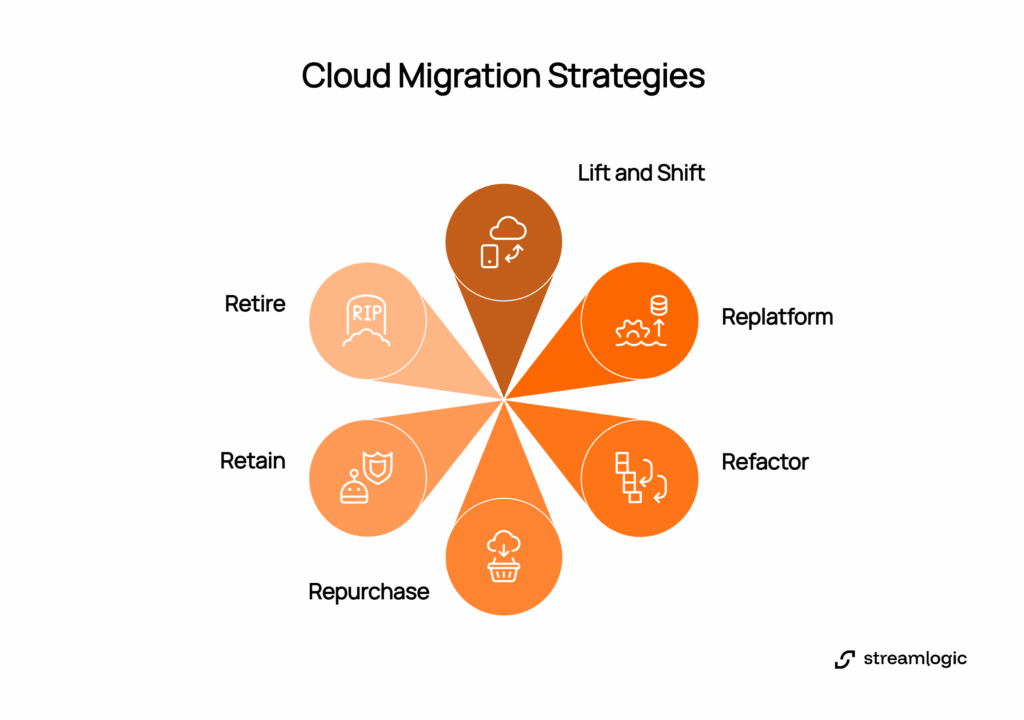
Six standard approaches handle different scenarios. Most companies use multiple strategies based on each workload's requirements.

Lift and shift migration moves applications without code changes, delivering fast results but capturing minimal cloud benefits. Replatform makes targeted modifications to use managed services while keeping core logic unchanged. You might replace self-managed MySQL with Amazon RDS. Refactor redesigns applications for cloud environments, typically breaking monoliths into microservices for maximum long-term benefits. Repurchase replaces custom software with SaaS products. Retain keeps certain systems on-premises due to regulatory or technical constraints. Retire decommissions systems that no longer serve business purposes.
Compare cloud providers
AWS migration provides the most extensive service catalog with mature tooling. AWS Database Migration Service handles database migration while AWS Application Migration Service enables lift and shift migration at scale.
Azure migration integrates seamlessly with Microsoft enterprise software, making it natural for organizations running Windows Server, SQL Server, or Active Directory. Azure Stack enables gradual hybrid cloud migration.
GCP migration delivers strong data analytics and machine learning capabilities with competitive pricing and superior Kubernetes support.
Many organizations adopt multi cloud migration strategies to avoid vendor lock-in and leverage each platform's strengths, though this increases operational complexity.
Table 1: Cloud provider comparison for migration scenarios
Migration need | AWS | Azure | GCP |
Service catalog | ✓ Broadest (200+) | Growing | Focused data/ML |
Microsoft integration | Basic | ✓ Native | Basic |
Database migration | DMS, SCT | Database Migration Service | Database Migration Service |
Lift and shift | ✓ Application Migration Service | Azure Migrate | Migrate for Compute Engine |
Hybrid capabilities | Outposts | ✓ Stack, Arc | Anthos |
Stage 3: Design cloud architecture and migration roadmap
Design cloud landing zone
Build the target environment before migrating workloads to establish the foundation every subsequent migration depends on. Cloud providers offer proven frameworks: AWS Control Tower automates account setup, Azure Landing Zones provide enterprise architectures, and Google Cloud Foundation toolkit delivers standardized structures.
These frameworks include network segmentation, identity management, centralized logging, automated backups, and disaster recovery procedures. Setting up a proper landing zone takes weeks but prevents months of remediation work later.
Develop your cloud migration roadmap
Sequence migrations in waves that build confidence while managing risk. Wave 1 moves non-critical applications to validate processes. Wave 2 handles moderately complex applications after refining procedures. Wave 3 tackles business-critical systems only after thoroughly testing the approach.
Document each workload's migration window, dependencies, and rollback procedures so business units understand when systems migrate and what disruption to expect.
Plan for cloud migration security
Security must be designed into every architectural decision from the beginning. Implement encryption for data at rest and in transit, configure firewalls and security groups before applications arrive, and test these controls thoroughly. A misconfigured security group creates vulnerabilities attackers exploit within hours.
Address cloud migration compliance requirements during architecture design. Map regulatory obligations like GDPR, HIPAA, or SOC 2 to concrete cloud controls. For guidance on compliance, book a consultation with our cloud experts.
Stage 4: Prepare applications and data for migration
Application assessment and modification
Legacy software often contains undocumented dependencies that exist only in production behavior. An application might query three databases and call two external APIs, with each connection requiring reconfiguration for cloud environments.
Hardcoded IP addresses that work on-premises fail in cloud environments where infrastructure changes dynamically. Externalize these settings into environment variables or cloud-native configuration services. Review software licensing carefully before migrating, because some vendors restrict cloud deployment or charge different rates.
Database migration planning
Database migration carries substantial risk because data loss destroys businesses and performance problems frustrate customers. Homogeneous migration moves databases keeping the same engine type, following straightforward paths. Heterogeneous migration changes database types, requiring schema conversion and extensive testing.
Oracle migration specifically demands careful planning due to proprietary features and complex licensing. Test extensively before production cutover to validate that all data transferred completely, query performance meets requirements, and backup procedures function as expected.
Create data migration plan
Calculate transfer times based on data volumes and network capacity. A 5TB database over 1Gbps requires approximately 12 hours for initial transfer, excluding validation time.
Choose methods based on volume: network transfer works for databases under 1TB; physical transfer using AWS Snowball, Azure Data Box, or Google Transfer Appliance accelerates datasets exceeding 10TB; hybrid approach combines both by transferring bulk data physically then synchronizing incremental changes over network.
Table 2: Data transfer method selection
Data volume | Method | Approximate time | Use case |
< 100GB | Network | 2-4 hours | Small databases |
100GB-1TB | Network | 4-24 hours | Medium databases |
1TB-10TB | Network/physical | 1-3 days | Large databases |
> 10TB | Physical | 3-7 days | Very large datasets |
Stage 5: Execute migration using proven strategies
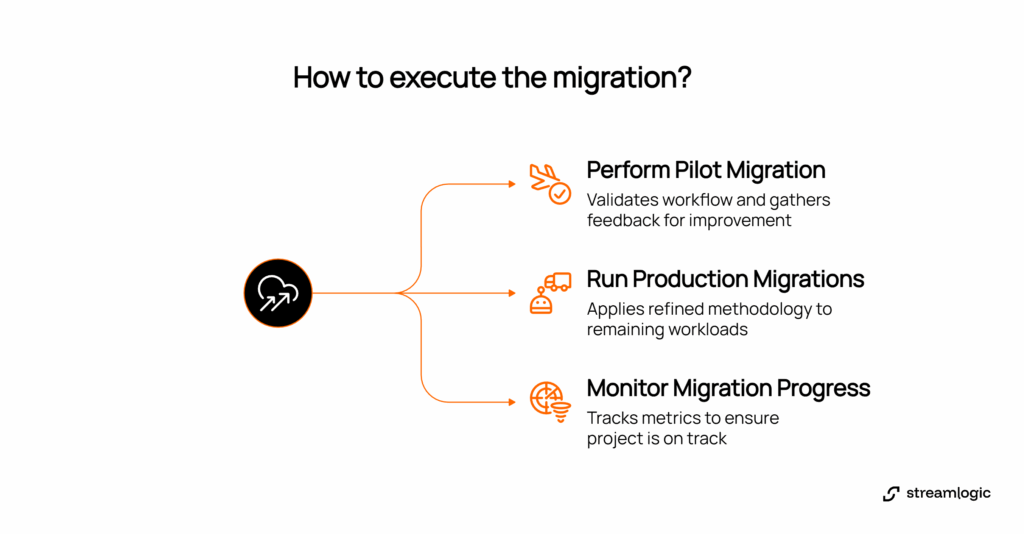
Perform pilot migration
Select the simplest application for first migration to validate complete workflow before handling critical systems. Execute every step: provision infrastructure, transfer data, update routing, conduct testing. Measure how long each phase requires because these timings inform subsequent scheduling.
Gather feedback from application owners and users to reveal process gaps and usability problems technical testing misses.
Run production migrations
Apply refined methodology to remaining workloads during maintenance windows. Establish cutover procedures: stop source application, perform final synchronization, validate data integrity, start cloud application, monitor intensively, and rollback if critical issues emerge.
Keep source systems operational until cloud systems prove stable through several days of production use.
Monitor migration progress
Track migrations against the roadmap using metrics reviewed weekly. These metrics reveal whether the project is on track or requires adjustments: workloads migrated versus planned, migration velocity trends, issues encountered and resolution time, business disruption incidents, and costs versus budget.
For organizations concerned about maintaining business continuity, staff augmentation with experienced cloud engineers can help keep projects on schedule.
Streamlogic case study: Logistics dashboard MVP in 4 weeks
Our team delivered a production-ready logistics dashboard MVP for a European provider in 40 hours of business effort through focused planning, automation, and deep cloud integration. The rapid delivery was enabled by our innovative solution that combines cutting-edge technologies across multiple disciplines and the insights gained from 15 years of engineering experience.
We started by defining a focused scope with the client. Together, we identified a game plan with the essential business journey needed for immediate value and assembled a senior cross-functional team. Instead of standups, we ran daily planning meetings that helped us keep communication clear and helped us eliminate delays throughout the project.
For the technical foundation, we built the backend on Vercel serverless functions that auto-scale as needed. Next.js powers the frontend, creating fast, responsive user experiences. Our engineers integrated Databricks for real-time data processing and analytics, connecting all components from the first sprint.
A notable part of the MVP was its automated data pipeline (ETL), which performed several transformation steps such as data cleaning, reformatting, and aggregation. This gives users reliable, up-to-date insights whenever they need them. Custom templates maintained consistency and efficiency across all transformations. The client specifically requested quota tracking functionality, so we made it a key aspect of the pipeline.
First release deliverables:
Real-time dashboard supporting multiple business clients
Automated data processing with multi-step transformations
Full integration with compliant cloud services
With our scientific, experience-based approach delivered actionable visibility into logistics operations five times faster than the industry average, treating the MVP as a solid foundation for future growth and a crucial first step in an ongoing delivery journey.
Deliver your next dashboard or workflow with the same clarity and efficiency. Let's talk.
Stage 6: Validate security, performance, and compliance
Security testing
Test whether security controls actually work by attempting to access systems using credentials that should be denied. Run security scanners to identify outdated software, misconfigured services, or exposed management interfaces, then address all critical findings before production launch.
Performance validation
Load testing simulates expected user volumes, starting with current traffic levels then increasing to 150-200% of peak to identify where response times degrade. Latency measurement quantifies network delays from different locations. Resource optimization analyzes consumption patterns and right-sizes instances to match actual requirements, directly reducing cloud costs.
Compliance verification
Document how the environment satisfies regulatory requirements: encryption configurations, access control policies, audit logging setup, tested backup procedures, and incident response plans. This evidence streamlines audits and demonstrates appropriate controls for cloud migration security and compliance have been implemented.
Table 3: Security and compliance validation checklist
Area | Validation task | Success criteria |
Access control | Test unauthorized access | All blocked, alerts generated |
Encryption | Scan for unencrypted data | 100% sensitive data encrypted |
Vulnerability | Run security scanners | Critical findings remediated |
Performance | Load test at 150% traffic | <200ms response maintained |
Backup | Test recovery | <4 hour RTO achieved |
Compliance | Audit controls | All requirements documented |
Stage 7: Optimize cloud costs and operations
Cost optimization
Organizations often waste significant portions of cloud spending on idle resources. Implementing disciplined cost controls immediately after migration prevents budget overruns.
Right-sizing matches instance sizes to actual workload requirements. Monitor utilization for two weeks, then adjust. Reserved instances deliver 30-60% discounts for predictable workloads. Auto-scaling adjusts capacity based on demand. Storage tiering moves infrequently accessed data to cheaper classes costing 90% less than primary storage.
If you want to improve the accuracy of your cost forecasting, book a session with our CTO Denis Avramenko for realistic projections.
Operational excellence
Automated monitoring notifies teams when metrics exceed thresholds indicating potential problems. Configure alerts for CPU utilization, memory consumption, error rates, and response times. Backup automation schedules regular backups and tests recovery quarterly. Untested backups are merely expensive storage. Change management documents infrastructure modifications before implementation.
Continuous improvement
Review performance metrics monthly to identify optimization opportunities. Stay current with cloud provider announcements because new services frequently provide better performance or lower costs. Invest in team training, because platforms evolve rapidly and teams that learn continuously leverage new capabilities effectively.
FAQ
How long does cloud migration take?
Migration timelines vary significantly based on complexity and scale. Organizations with dedicated migration teams and clear priorities typically complete projects faster than those learning cloud technologies during migration. Timeline depends on the number of applications, their complexity, data volumes, team experience, and chosen cloud migration strategies.
What are the biggest risks in cloud migration?
Five primary risks threaten migrations: unexpected downtime during cutover, data loss from incomplete transfers, security vulnerabilities in new environments, cost overruns from poor planning, and knowledge gaps in cloud-native operations. Mitigate through comprehensive testing, verified backups, security-first architecture, detailed cost modeling, and partnerships with experienced specialists.
Should we use a multi cloud strategy or a single provider?
Multi cloud strategy provides vendor independence and access to each provider's strengths, but managing hybrid and multi cloud environments demands additional expertise and governance frameworks. Choose a single provider when simplicity matters most. Adopt multi cloud migration when regulatory requirements, risk diversification, or specific capabilities justify the complexity.
How do we handle database migration for Oracle systems?
Oracle migration requires careful planning due to proprietary features and complex licensing. Options include keeping Oracle in the cloud using managed services (simplest but expensive), migrating to alternative commercial databases (moderate complexity), or converting to open-source databases like PostgreSQL (highest savings but most complex). Database migration tools from AWS, Azure, and GCP automate schema conversion.
What cloud migration best practices ensure success?
Cloud migration best practices include conducting thorough migration readiness assessment before starting, selecting appropriate cloud migration strategy for each workload, executing pilot migrations first, maintaining rollback capabilities, implementing security controls from day one, monitoring cloud costs actively, and documenting procedures. Organizations following these practices experience 60% fewer issues and complete projects 30% faster.
Conclusion

Cloud migration momentum shows no signs of slowing. According to IDC, worldwide spending on public cloud services will reach $1.35 trillion by 2027, representing a five-year compound annual growth rate of 19.9%. This accelerating investment reflects cloud computing's shift from competitive advantage to operational necessity.
Successful migration requires aligning technical decisions with business objectives, executing in phases that build confidence while managing risk, and treating security and cost optimization as ongoing practices rather than one-time checkboxes.


Denis Avramenko
CTO, Co-Founder, Streamlogic
Reading Time: 10 minutes
Cloud migration moves applications, databases, and workloads from on-premises infrastructure to platforms like AWS, Azure, or GCP. Teams stop managing hardware failures and focus on building features that drive revenue.
According to Gartner's latest forecast, worldwide spending on public cloud services will reach $723.4 billion in 2025, up 21.5% from the previous year. The same research predicts that 90% of organizations will adopt hybrid cloud approaches through 2027. Properly executed migrations deliver substantial infrastructure cost reductions and accelerate deployment cycles from months to days.
Table of contents
What drives companies to migrate
Stage 1: Define business objectives and migration readiness assessment
Stage 2: Select your cloud strategy and provider
Stage 3: Design cloud architecture and migration roadmap
Stage 4: Prepare applications and data for migration
Stage 5: Execute migration using proven strategies
Streamlogic case study: Logistics dashboard MVP in 4 weeks
Stage 6: Validate security, performance, and compliance
Stage 7: Optimize cloud costs and operations
What drives companies to migrate

Three pressures typically force migration decisions. First, infrastructure costs keep rising while budgets stay flat. Second, competitors launch features faster because they're not constrained by procurement cycles. Third, customers expect always-on services that traditional infrastructure struggles to deliver economically.
IDC's 2024 Cloud Pulse Survey found that 60% of cloud buyers believe their IT infrastructure requires major transformation, while 82% reported their existing cloud environments need modernization. These responses reflect concrete problems: applications can't handle seasonal traffic spikes, security vulnerabilities persist in aging systems, and operational complexity consumes engineering time.
Migration addresses these challenges by shifting infrastructure management to specialists. Cloud providers handle most infrastructure‑level security patches, capacity, and disaster recovery, while customers still own application and data security under a shared responsibility model.
Stage 1: Define business objectives and migration readiness assessment
Set clear goals
Document specific, measurable outcomes before technical work begins. Concrete targets with numbers and deadlines work best: reduce monthly infrastructure spend from $50,000 to $35,000 by Q4 2026, or cut deployment time from three weeks to two days.
Connect each goal to business outcomes:
Eliminate data center lease costs by moving all workloads to cloud by Q3 2026
Support 5,000 concurrent users during traffic peaks without manual intervention
Achieve 99.9% uptime for customer-facing applications
Enable analytics queries without impacting transaction performance
Conduct migration readiness assessment
Create a comprehensive inventory using automated discovery tools that map relationships between systems faster than manual documentation. These tools reveal dependencies that exist only in production behavior: the undocumented connections between services that no one remembers creating.
For each workload, determine whether it can run in cloud environments without code modifications, what business impact occurs if downtime happens during migration, and whether it processes sensitive data requiring specific compliance controls. Many companies discover they're maintaining applications that serve no business purpose and are candidates to decommission rather than migrate.
Build your migration team
Successful migrations depend on clear ownership distributed across key roles. An executive sponsor removes obstacles and secures funding. A cloud architect designs target infrastructure. Application owners understand how systems work in production. A security lead ensures compliance. A finance representative tracks spending. These people meet weekly during active migration phases to review progress and adjust plans.
Stage 2: Select your cloud strategy and provider
Choose your cloud migration strategy
Six standard approaches handle different scenarios. Most companies use multiple strategies based on each workload's requirements.

Lift and shift migration moves applications without code changes, delivering fast results but capturing minimal cloud benefits. Replatform makes targeted modifications to use managed services while keeping core logic unchanged. You might replace self-managed MySQL with Amazon RDS. Refactor redesigns applications for cloud environments, typically breaking monoliths into microservices for maximum long-term benefits. Repurchase replaces custom software with SaaS products. Retain keeps certain systems on-premises due to regulatory or technical constraints. Retire decommissions systems that no longer serve business purposes.
Compare cloud providers
AWS migration provides the most extensive service catalog with mature tooling. AWS Database Migration Service handles database migration while AWS Application Migration Service enables lift and shift migration at scale.
Azure migration integrates seamlessly with Microsoft enterprise software, making it natural for organizations running Windows Server, SQL Server, or Active Directory. Azure Stack enables gradual hybrid cloud migration.
GCP migration delivers strong data analytics and machine learning capabilities with competitive pricing and superior Kubernetes support.
Many organizations adopt multi cloud migration strategies to avoid vendor lock-in and leverage each platform's strengths, though this increases operational complexity.
Table 1: Cloud provider comparison for migration scenarios
Migration need | AWS | Azure | GCP |
Service catalog | ✓ Broadest (200+) | Growing | Focused data/ML |
Microsoft integration | Basic | ✓ Native | Basic |
Database migration | DMS, SCT | Database Migration Service | Database Migration Service |
Lift and shift | ✓ Application Migration Service | Azure Migrate | Migrate for Compute Engine |
Hybrid capabilities | Outposts | ✓ Stack, Arc | Anthos |
Stage 3: Design cloud architecture and migration roadmap
Design cloud landing zone
Build the target environment before migrating workloads to establish the foundation every subsequent migration depends on. Cloud providers offer proven frameworks: AWS Control Tower automates account setup, Azure Landing Zones provide enterprise architectures, and Google Cloud Foundation toolkit delivers standardized structures.
These frameworks include network segmentation, identity management, centralized logging, automated backups, and disaster recovery procedures. Setting up a proper landing zone takes weeks but prevents months of remediation work later.
Develop your cloud migration roadmap
Sequence migrations in waves that build confidence while managing risk. Wave 1 moves non-critical applications to validate processes. Wave 2 handles moderately complex applications after refining procedures. Wave 3 tackles business-critical systems only after thoroughly testing the approach.
Document each workload's migration window, dependencies, and rollback procedures so business units understand when systems migrate and what disruption to expect.
Plan for cloud migration security
Security must be designed into every architectural decision from the beginning. Implement encryption for data at rest and in transit, configure firewalls and security groups before applications arrive, and test these controls thoroughly. A misconfigured security group creates vulnerabilities attackers exploit within hours.
Address cloud migration compliance requirements during architecture design. Map regulatory obligations like GDPR, HIPAA, or SOC 2 to concrete cloud controls. For guidance on compliance, book a consultation with our cloud experts.
Stage 4: Prepare applications and data for migration
Application assessment and modification
Legacy software often contains undocumented dependencies that exist only in production behavior. An application might query three databases and call two external APIs, with each connection requiring reconfiguration for cloud environments.
Hardcoded IP addresses that work on-premises fail in cloud environments where infrastructure changes dynamically. Externalize these settings into environment variables or cloud-native configuration services. Review software licensing carefully before migrating, because some vendors restrict cloud deployment or charge different rates.
Database migration planning
Database migration carries substantial risk because data loss destroys businesses and performance problems frustrate customers. Homogeneous migration moves databases keeping the same engine type, following straightforward paths. Heterogeneous migration changes database types, requiring schema conversion and extensive testing.
Oracle migration specifically demands careful planning due to proprietary features and complex licensing. Test extensively before production cutover to validate that all data transferred completely, query performance meets requirements, and backup procedures function as expected.
Create data migration plan
Calculate transfer times based on data volumes and network capacity. A 5TB database over 1Gbps requires approximately 12 hours for initial transfer, excluding validation time.
Choose methods based on volume: network transfer works for databases under 1TB; physical transfer using AWS Snowball, Azure Data Box, or Google Transfer Appliance accelerates datasets exceeding 10TB; hybrid approach combines both by transferring bulk data physically then synchronizing incremental changes over network.
Table 2: Data transfer method selection
Data volume | Method | Approximate time | Use case |
< 100GB | Network | 2-4 hours | Small databases |
100GB-1TB | Network | 4-24 hours | Medium databases |
1TB-10TB | Network/physical | 1-3 days | Large databases |
> 10TB | Physical | 3-7 days | Very large datasets |
Stage 5: Execute migration using proven strategies
Perform pilot migration
Select the simplest application for first migration to validate complete workflow before handling critical systems. Execute every step: provision infrastructure, transfer data, update routing, conduct testing. Measure how long each phase requires because these timings inform subsequent scheduling.
Gather feedback from application owners and users to reveal process gaps and usability problems technical testing misses.
Run production migrations
Apply refined methodology to remaining workloads during maintenance windows. Establish cutover procedures: stop source application, perform final synchronization, validate data integrity, start cloud application, monitor intensively, and rollback if critical issues emerge.
Keep source systems operational until cloud systems prove stable through several days of production use.
Monitor migration progress
Track migrations against the roadmap using metrics reviewed weekly. These metrics reveal whether the project is on track or requires adjustments: workloads migrated versus planned, migration velocity trends, issues encountered and resolution time, business disruption incidents, and costs versus budget.

For organizations concerned about maintaining business continuity, staff augmentation with experienced cloud engineers can help keep projects on schedule.
Streamlogic case study: Logistics dashboard MVP in 4 weeks
Our team delivered a production-ready logistics dashboard MVP for a European provider in 40 hours of business effort through focused planning, automation, and deep cloud integration. The rapid delivery was enabled by our innovative solution that combines cutting-edge technologies across multiple disciplines and the insights gained from 15 years of engineering experience.
We started by defining a focused scope with the client. Together, we identified a game plan with the essential business journey needed for immediate value and assembled a senior cross-functional team. Instead of standups, we ran daily planning meetings that helped us keep communication clear and helped us eliminate delays throughout the project.
For the technical foundation, we built the backend on Vercel serverless functions that auto-scale as needed. Next.js powers the frontend, creating fast, responsive user experiences. Our engineers integrated Databricks for real-time data processing and analytics, connecting all components from the first sprint.
A notable part of the MVP was its automated data pipeline (ETL), which performed several transformation steps such as data cleaning, reformatting, and aggregation. This gives users reliable, up-to-date insights whenever they need them. Custom templates maintained consistency and efficiency across all transformations. The client specifically requested quota tracking functionality, so we made it a key aspect of the pipeline.
First release deliverables:
Real-time dashboard supporting multiple business clients
Automated data processing with multi-step transformations
Full integration with compliant cloud services
With our scientific, experience-based approach delivered actionable visibility into logistics operations five times faster than the industry average, treating the MVP as a solid foundation for future growth and a crucial first step in an ongoing delivery journey.
Deliver your next dashboard or workflow with the same clarity and efficiency. Let's talk.
Stage 6: Validate security, performance, and compliance
Security testing
Test whether security controls actually work by attempting to access systems using credentials that should be denied. Run security scanners to identify outdated software, misconfigured services, or exposed management interfaces, then address all critical findings before production launch.
Performance validation
Load testing simulates expected user volumes, starting with current traffic levels then increasing to 150-200% of peak to identify where response times degrade. Latency measurement quantifies network delays from different locations. Resource optimization analyzes consumption patterns and right-sizes instances to match actual requirements, directly reducing cloud costs.
Compliance verification
Document how the environment satisfies regulatory requirements: encryption configurations, access control policies, audit logging setup, tested backup procedures, and incident response plans. This evidence streamlines audits and demonstrates appropriate controls for cloud migration security and compliance have been implemented.
Table 3: Security and compliance validation checklist
Area | Validation task | Success criteria |
Access control | Test unauthorized access | All blocked, alerts generated |
Encryption | Scan for unencrypted data | 100% sensitive data encrypted |
Vulnerability | Run security scanners | Critical findings remediated |
Performance | Load test at 150% traffic | <200ms response maintained |
Backup | Test recovery | <4 hour RTO achieved |
Compliance | Audit controls | All requirements documented |
Stage 7: Optimize cloud costs and operations
Cost optimization
Organizations often waste significant portions of cloud spending on idle resources. Implementing disciplined cost controls immediately after migration prevents budget overruns.
Right-sizing matches instance sizes to actual workload requirements. Monitor utilization for two weeks, then adjust. Reserved instances deliver 30-60% discounts for predictable workloads. Auto-scaling adjusts capacity based on demand. Storage tiering moves infrequently accessed data to cheaper classes costing 90% less than primary storage.
If you want to improve the accuracy of your cost forecasting, book a session with our CTO Denis Avramenko for realistic projections.
Operational excellence
Automated monitoring notifies teams when metrics exceed thresholds indicating potential problems. Configure alerts for CPU utilization, memory consumption, error rates, and response times. Backup automation schedules regular backups and tests recovery quarterly. Untested backups are merely expensive storage. Change management documents infrastructure modifications before implementation.
Continuous improvement
Review performance metrics monthly to identify optimization opportunities. Stay current with cloud provider announcements because new services frequently provide better performance or lower costs. Invest in team training, because platforms evolve rapidly and teams that learn continuously leverage new capabilities effectively.
FAQ
How long does cloud migration take?
Migration timelines vary significantly based on complexity and scale. Organizations with dedicated migration teams and clear priorities typically complete projects faster than those learning cloud technologies during migration. Timeline depends on the number of applications, their complexity, data volumes, team experience, and chosen cloud migration strategies.
What are the biggest risks in cloud migration?
Five primary risks threaten migrations: unexpected downtime during cutover, data loss from incomplete transfers, security vulnerabilities in new environments, cost overruns from poor planning, and knowledge gaps in cloud-native operations. Mitigate through comprehensive testing, verified backups, security-first architecture, detailed cost modeling, and partnerships with experienced specialists.
Should we use a multi cloud strategy or a single provider?
Multi cloud strategy provides vendor independence and access to each provider's strengths, but managing hybrid and multi cloud environments demands additional expertise and governance frameworks. Choose a single provider when simplicity matters most. Adopt multi cloud migration when regulatory requirements, risk diversification, or specific capabilities justify the complexity.
How do we handle database migration for Oracle systems?
Oracle migration requires careful planning due to proprietary features and complex licensing. Options include keeping Oracle in the cloud using managed services (simplest but expensive), migrating to alternative commercial databases (moderate complexity), or converting to open-source databases like PostgreSQL (highest savings but most complex). Database migration tools from AWS, Azure, and GCP automate schema conversion.
What cloud migration best practices ensure success?
Cloud migration best practices include conducting thorough migration readiness assessment before starting, selecting appropriate cloud migration strategy for each workload, executing pilot migrations first, maintaining rollback capabilities, implementing security controls from day one, monitoring cloud costs actively, and documenting procedures. Organizations following these practices experience 60% fewer issues and complete projects 30% faster.
Conclusion

Cloud migration momentum shows no signs of slowing. According to IDC, worldwide spending on public cloud services will reach $1.35 trillion by 2027, representing a five-year compound annual growth rate of 19.9%. This accelerating investment reflects cloud computing's shift from competitive advantage to operational necessity.
Successful migration requires aligning technical decisions with business objectives, executing in phases that build confidence while managing risk, and treating security and cost optimization as ongoing practices rather than one-time checkboxes.

Denis Avramenko
CTO, Co-Founder, Streamlogic
Reading Time: 10 minutes
Cloud migration moves applications, databases, and workloads from on-premises infrastructure to platforms like AWS, Azure, or GCP. Teams stop managing hardware failures and focus on building features that drive revenue.
According to Gartner's latest forecast, worldwide spending on public cloud services will reach $723.4 billion in 2025, up 21.5% from the previous year. The same research predicts that 90% of organizations will adopt hybrid cloud approaches through 2027. Properly executed migrations deliver substantial infrastructure cost reductions and accelerate deployment cycles from months to days.
Table of contents
What drives companies to migrate
Stage 1: Define business objectives and migration readiness assessment
Stage 2: Select your cloud strategy and provider
Stage 3: Design cloud architecture and migration roadmap
Stage 4: Prepare applications and data for migration
Stage 5: Execute migration using proven strategies
Streamlogic case study: Logistics dashboard MVP in 4 weeks
Stage 6: Validate security, performance, and compliance
Stage 7: Optimize cloud costs and operations
What drives companies to migrate

Three pressures typically force migration decisions. First, infrastructure costs keep rising while budgets stay flat. Second, competitors launch features faster because they're not constrained by procurement cycles. Third, customers expect always-on services that traditional infrastructure struggles to deliver economically.
IDC's 2024 Cloud Pulse Survey found that 60% of cloud buyers believe their IT infrastructure requires major transformation, while 82% reported their existing cloud environments need modernization. These responses reflect concrete problems: applications can't handle seasonal traffic spikes, security vulnerabilities persist in aging systems, and operational complexity consumes engineering time.
Migration addresses these challenges by shifting infrastructure management to specialists. Cloud providers handle most infrastructure‑level security patches, capacity, and disaster recovery, while customers still own application and data security under a shared responsibility model.
Stage 1: Define business objectives and migration readiness assessment
Set clear goals
Document specific, measurable outcomes before technical work begins. Concrete targets with numbers and deadlines work best: reduce monthly infrastructure spend from $50,000 to $35,000 by Q4 2026, or cut deployment time from three weeks to two days.
Connect each goal to business outcomes:
Eliminate data center lease costs by moving all workloads to cloud by Q3 2026
Support 5,000 concurrent users during traffic peaks without manual intervention
Achieve 99.9% uptime for customer-facing applications
Enable analytics queries without impacting transaction performance
Conduct migration readiness assessment
Create a comprehensive inventory using automated discovery tools that map relationships between systems faster than manual documentation. These tools reveal dependencies that exist only in production behavior: the undocumented connections between services that no one remembers creating.
For each workload, determine whether it can run in cloud environments without code modifications, what business impact occurs if downtime happens during migration, and whether it processes sensitive data requiring specific compliance controls. Many companies discover they're maintaining applications that serve no business purpose and are candidates to decommission rather than migrate.
Build your migration team
Successful migrations depend on clear ownership distributed across key roles. An executive sponsor removes obstacles and secures funding. A cloud architect designs target infrastructure. Application owners understand how systems work in production. A security lead ensures compliance. A finance representative tracks spending. These people meet weekly during active migration phases to review progress and adjust plans.
Stage 2: Select your cloud strategy and provider
Choose your cloud migration strategy
Six standard approaches handle different scenarios. Most companies use multiple strategies based on each workload's requirements.

Lift and shift migration moves applications without code changes, delivering fast results but capturing minimal cloud benefits. Replatform makes targeted modifications to use managed services while keeping core logic unchanged. You might replace self-managed MySQL with Amazon RDS. Refactor redesigns applications for cloud environments, typically breaking monoliths into microservices for maximum long-term benefits. Repurchase replaces custom software with SaaS products. Retain keeps certain systems on-premises due to regulatory or technical constraints. Retire decommissions systems that no longer serve business purposes.
Compare cloud providers
AWS migration provides the most extensive service catalog with mature tooling. AWS Database Migration Service handles database migration while AWS Application Migration Service enables lift and shift migration at scale.
Azure migration integrates seamlessly with Microsoft enterprise software, making it natural for organizations running Windows Server, SQL Server, or Active Directory. Azure Stack enables gradual hybrid cloud migration.
GCP migration delivers strong data analytics and machine learning capabilities with competitive pricing and superior Kubernetes support.
Many organizations adopt multi cloud migration strategies to avoid vendor lock-in and leverage each platform's strengths, though this increases operational complexity.
Table 1: Cloud provider comparison for migration scenarios
Migration need | AWS | Azure | GCP |
Service catalog | ✓ Broadest (200+) | Growing | Focused data/ML |
Microsoft integration | Basic | ✓ Native | Basic |
Database migration | DMS, SCT | Database Migration Service | Database Migration Service |
Lift and shift | ✓ Application Migration Service | Azure Migrate | Migrate for Compute Engine |
Hybrid capabilities | Outposts | ✓ Stack, Arc | Anthos |
Stage 3: Design cloud architecture and migration roadmap
Design cloud landing zone
Build the target environment before migrating workloads to establish the foundation every subsequent migration depends on. Cloud providers offer proven frameworks: AWS Control Tower automates account setup, Azure Landing Zones provide enterprise architectures, and Google Cloud Foundation toolkit delivers standardized structures.
These frameworks include network segmentation, identity management, centralized logging, automated backups, and disaster recovery procedures. Setting up a proper landing zone takes weeks but prevents months of remediation work later.
Develop your cloud migration roadmap
Sequence migrations in waves that build confidence while managing risk. Wave 1 moves non-critical applications to validate processes. Wave 2 handles moderately complex applications after refining procedures. Wave 3 tackles business-critical systems only after thoroughly testing the approach.
Document each workload's migration window, dependencies, and rollback procedures so business units understand when systems migrate and what disruption to expect.
Plan for cloud migration security
Security must be designed into every architectural decision from the beginning. Implement encryption for data at rest and in transit, configure firewalls and security groups before applications arrive, and test these controls thoroughly. A misconfigured security group creates vulnerabilities attackers exploit within hours.
Address cloud migration compliance requirements during architecture design. Map regulatory obligations like GDPR, HIPAA, or SOC 2 to concrete cloud controls. For guidance on compliance, book a consultation with our cloud experts.
Stage 4: Prepare applications and data for migration
Application assessment and modification
Legacy software often contains undocumented dependencies that exist only in production behavior. An application might query three databases and call two external APIs, with each connection requiring reconfiguration for cloud environments.
Hardcoded IP addresses that work on-premises fail in cloud environments where infrastructure changes dynamically. Externalize these settings into environment variables or cloud-native configuration services. Review software licensing carefully before migrating, because some vendors restrict cloud deployment or charge different rates.
Database migration planning
Database migration carries substantial risk because data loss destroys businesses and performance problems frustrate customers. Homogeneous migration moves databases keeping the same engine type, following straightforward paths. Heterogeneous migration changes database types, requiring schema conversion and extensive testing.
Oracle migration specifically demands careful planning due to proprietary features and complex licensing. Test extensively before production cutover to validate that all data transferred completely, query performance meets requirements, and backup procedures function as expected.
Create data migration plan
Calculate transfer times based on data volumes and network capacity. A 5TB database over 1Gbps requires approximately 12 hours for initial transfer, excluding validation time.
Choose methods based on volume: network transfer works for databases under 1TB; physical transfer using AWS Snowball, Azure Data Box, or Google Transfer Appliance accelerates datasets exceeding 10TB; hybrid approach combines both by transferring bulk data physically then synchronizing incremental changes over network.
Table 2: Data transfer method selection
Data volume | Method | Approximate time | Use case |
< 100GB | Network | 2-4 hours | Small databases |
100GB-1TB | Network | 4-24 hours | Medium databases |
1TB-10TB | Network/physical | 1-3 days | Large databases |
> 10TB | Physical | 3-7 days | Very large datasets |
Stage 5: Execute migration using proven strategies
Perform pilot migration
Select the simplest application for first migration to validate complete workflow before handling critical systems. Execute every step: provision infrastructure, transfer data, update routing, conduct testing. Measure how long each phase requires because these timings inform subsequent scheduling.
Gather feedback from application owners and users to reveal process gaps and usability problems technical testing misses.
Run production migrations
Apply refined methodology to remaining workloads during maintenance windows. Establish cutover procedures: stop source application, perform final synchronization, validate data integrity, start cloud application, monitor intensively, and rollback if critical issues emerge.
Keep source systems operational until cloud systems prove stable through several days of production use.
Monitor migration progress
Track migrations against the roadmap using metrics reviewed weekly. These metrics reveal whether the project is on track or requires adjustments: workloads migrated versus planned, migration velocity trends, issues encountered and resolution time, business disruption incidents, and costs versus budget.

For organizations concerned about maintaining business continuity, staff augmentation with experienced cloud engineers can help keep projects on schedule.
Streamlogic case study: Logistics dashboard MVP in 4 weeks
Our team delivered a production-ready logistics dashboard MVP for a European provider in 40 hours of business effort through focused planning, automation, and deep cloud integration. The rapid delivery was enabled by our innovative solution that combines cutting-edge technologies across multiple disciplines and the insights gained from 15 years of engineering experience.
We started by defining a focused scope with the client. Together, we identified a game plan with the essential business journey needed for immediate value and assembled a senior cross-functional team. Instead of standups, we ran daily planning meetings that helped us keep communication clear and helped us eliminate delays throughout the project.
For the technical foundation, we built the backend on Vercel serverless functions that auto-scale as needed. Next.js powers the frontend, creating fast, responsive user experiences. Our engineers integrated Databricks for real-time data processing and analytics, connecting all components from the first sprint.
A notable part of the MVP was its automated data pipeline (ETL), which performed several transformation steps such as data cleaning, reformatting, and aggregation. This gives users reliable, up-to-date insights whenever they need them. Custom templates maintained consistency and efficiency across all transformations. The client specifically requested quota tracking functionality, so we made it a key aspect of the pipeline.
First release deliverables:
Real-time dashboard supporting multiple business clients
Automated data processing with multi-step transformations
Full integration with compliant cloud services
With our scientific, experience-based approach delivered actionable visibility into logistics operations five times faster than the industry average, treating the MVP as a solid foundation for future growth and a crucial first step in an ongoing delivery journey.
Deliver your next dashboard or workflow with the same clarity and efficiency. Let's talk.
Stage 6: Validate security, performance, and compliance
Security testing
Test whether security controls actually work by attempting to access systems using credentials that should be denied. Run security scanners to identify outdated software, misconfigured services, or exposed management interfaces, then address all critical findings before production launch.
Performance validation
Load testing simulates expected user volumes, starting with current traffic levels then increasing to 150-200% of peak to identify where response times degrade. Latency measurement quantifies network delays from different locations. Resource optimization analyzes consumption patterns and right-sizes instances to match actual requirements, directly reducing cloud costs.
Compliance verification
Document how the environment satisfies regulatory requirements: encryption configurations, access control policies, audit logging setup, tested backup procedures, and incident response plans. This evidence streamlines audits and demonstrates appropriate controls for cloud migration security and compliance have been implemented.
Table 3: Security and compliance validation checklist
Area | Validation task | Success criteria |
Access control | Test unauthorized access | All blocked, alerts generated |
Encryption | Scan for unencrypted data | 100% sensitive data encrypted |
Vulnerability | Run security scanners | Critical findings remediated |
Performance | Load test at 150% traffic | <200ms response maintained |
Backup | Test recovery | <4 hour RTO achieved |
Compliance | Audit controls | All requirements documented |
Stage 7: Optimize cloud costs and operations
Cost optimization
Organizations often waste significant portions of cloud spending on idle resources. Implementing disciplined cost controls immediately after migration prevents budget overruns.
Right-sizing matches instance sizes to actual workload requirements. Monitor utilization for two weeks, then adjust. Reserved instances deliver 30-60% discounts for predictable workloads. Auto-scaling adjusts capacity based on demand. Storage tiering moves infrequently accessed data to cheaper classes costing 90% less than primary storage.
If you want to improve the accuracy of your cost forecasting, book a session with our CTO Denis Avramenko for realistic projections.
Operational excellence
Automated monitoring notifies teams when metrics exceed thresholds indicating potential problems. Configure alerts for CPU utilization, memory consumption, error rates, and response times. Backup automation schedules regular backups and tests recovery quarterly. Untested backups are merely expensive storage. Change management documents infrastructure modifications before implementation.
Continuous improvement
Review performance metrics monthly to identify optimization opportunities. Stay current with cloud provider announcements because new services frequently provide better performance or lower costs. Invest in team training, because platforms evolve rapidly and teams that learn continuously leverage new capabilities effectively.
FAQ
How long does cloud migration take?
Migration timelines vary significantly based on complexity and scale. Organizations with dedicated migration teams and clear priorities typically complete projects faster than those learning cloud technologies during migration. Timeline depends on the number of applications, their complexity, data volumes, team experience, and chosen cloud migration strategies.
What are the biggest risks in cloud migration?
Five primary risks threaten migrations: unexpected downtime during cutover, data loss from incomplete transfers, security vulnerabilities in new environments, cost overruns from poor planning, and knowledge gaps in cloud-native operations. Mitigate through comprehensive testing, verified backups, security-first architecture, detailed cost modeling, and partnerships with experienced specialists.
Should we use a multi cloud strategy or a single provider?
Multi cloud strategy provides vendor independence and access to each provider's strengths, but managing hybrid and multi cloud environments demands additional expertise and governance frameworks. Choose a single provider when simplicity matters most. Adopt multi cloud migration when regulatory requirements, risk diversification, or specific capabilities justify the complexity.
How do we handle database migration for Oracle systems?
Oracle migration requires careful planning due to proprietary features and complex licensing. Options include keeping Oracle in the cloud using managed services (simplest but expensive), migrating to alternative commercial databases (moderate complexity), or converting to open-source databases like PostgreSQL (highest savings but most complex). Database migration tools from AWS, Azure, and GCP automate schema conversion.
What cloud migration best practices ensure success?
Cloud migration best practices include conducting thorough migration readiness assessment before starting, selecting appropriate cloud migration strategy for each workload, executing pilot migrations first, maintaining rollback capabilities, implementing security controls from day one, monitoring cloud costs actively, and documenting procedures. Organizations following these practices experience 60% fewer issues and complete projects 30% faster.
Conclusion

Cloud migration momentum shows no signs of slowing. According to IDC, worldwide spending on public cloud services will reach $1.35 trillion by 2027, representing a five-year compound annual growth rate of 19.9%. This accelerating investment reflects cloud computing's shift from competitive advantage to operational necessity.
Successful migration requires aligning technical decisions with business objectives, executing in phases that build confidence while managing risk, and treating security and cost optimization as ongoing practices rather than one-time checkboxes.

Denis Avramenko
CTO, Co-Founder, Streamlogic
Tech Council
Technology Articles
Cloud migration step by step: 7 stages for success in 2026
Complete cloud migration roadmap. Learn AWS, Azure, GCP migration strategies, security practices, and how to reduce cloud costs while ensuring compliance.

Denis Avramenko
CTO, Co-Founder, Streamlogic
Dec 6, 2025